
Last updated on
Oct 31, 2026
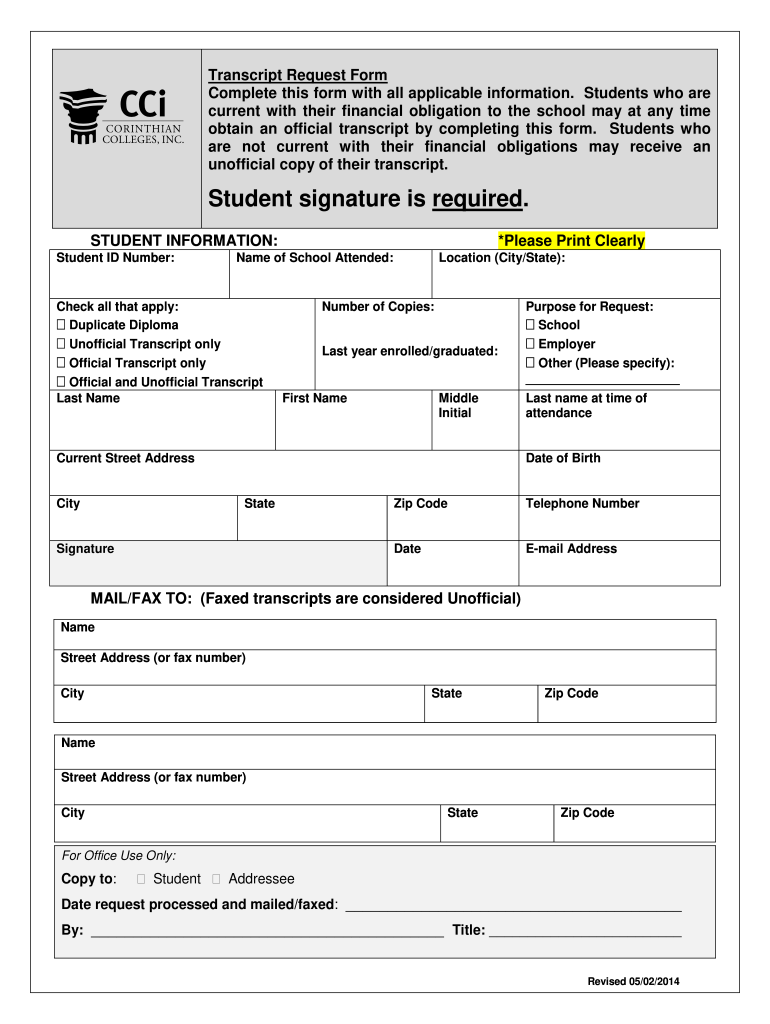
Corinthian Colleges Inc Transcript Request Form 2009-2026 free printable template
pdfFiller is not affiliated with any government organization

Fill out
Complete the form online in a simple drag-and-drop editor.

eSign
Add your legally binding signature or send the form for signing.

Share
Share the form via a link, letting anyone fill it out from any device.

Export
Download, print, email, or move the form to your cloud storage.
Why pdfFiller is the best tool for your documents and forms


End-to-end document management
From editing and signing to collaboration and tracking, pdfFiller has everything you need to get your documents done quickly and efficiently.
Accessible from anywhere
pdfFiller is fully cloud-based. This means you can edit, sign, and share documents from anywhere using your computer, smartphone, or tablet.
Secure and compliant
pdfFiller lets you securely manage documents following global laws like ESIGN, CCPA, and GDPR. It's also HIPAA and SOC 2 compliant.
What is Corinthian Colleges Inc Transcript Request Form
The Transcript Request Form is an official document used by students to request their academic transcripts from a school.
pdfFiller scores top ratings on review platforms




Who needs Corinthian Colleges Inc Transcript Request Form?
Explore how professionals across industries use pdfFiller.

Corinthian Colleges Inc Transcript Request Form is needed by:
-
High school students requesting transcripts for college applications
-
College students needing transcripts for transfer purposes
-
Graduates seeking copies of their final academic records
-
Parents requesting transcripts on behalf of their children
-
Educational institutions verifying student records
Comprehensive Guide to Corinthian Colleges Inc Transcript Request Form
What is the Transcript Request Form?
The Transcript Request Form serves a crucial role for students seeking to obtain their academic records. This form allows students to request either official or unofficial transcripts, ensuring they have the necessary documentation for various purposes. Official transcripts typically bear the school's seal and are often required for college admissions, while unofficial transcripts can be used for personal review or certain job applications.
Understanding the differences between these types of transcripts is vital for students planning their academic and professional futures. Whether you need the official transcript form for a college application or an unofficial transcript for personal records, the Transcript Request Form facilitates this process efficiently.
Purpose and Benefits of the Transcript Request Form
Students may need their transcripts for several important reasons. They are essential for college applications, scholarship eligibility, and job opportunities. Accessing transcripts quickly can significantly streamline these processes, allowing students to meet deadlines and fulfill requirements without unnecessary delays.
Besides the immediate need for transcripts, having quick access to academic records can greatly benefit students in managing their educational journey. This ensures that they can provide accurate information to potential colleges and employers in a timely manner.
Who Needs the Transcript Request Form?
The primary users of the Transcript Request Form are students who require their academic records for various reasons. Typically, any student who has completed coursework and needs to provide proof of their educational achievements will need to fill this form out. Circumstances that necessitate it include applying for higher education, internships, or job openings.
To fill out this form, students must meet specific eligibility criteria, such as being currently enrolled or having graduated from the institution. Understanding these requirements ensures a smoother application process for accessing educational records.
How to Fill Out the Transcript Request Form Online
Completing the Transcript Request Form online involves several key steps. First, students should gather essential information, such as their student ID, contact details, and the number of copies requested. Next, they can proceed to fill out each field accurately.
-
Student ID Number
-
Contact Information
-
Purpose of the Request
-
Signature and Date
Each field requires careful attention to ensure all necessary information is included for processing the request efficiently.
Review and Validation Checklist for the Transcript Request Form
-
Missing signature
-
Incorrect contact details
-
Not specifying the number of copies needed
Using a checklist to verify that all required fields are complete can help prevent these mistakes and ensure the request is processed without issues.
How to Submit the Transcript Request Form
Submitting the Transcript Request Form can be done through various methods. Students can choose to mail the form, fax it, or use an online submission option if available. Each method has its requirements, especially regarding ensuring the form’s security during transmission.
To guarantee secure submission, students should double-check that the form is properly filled out and mailed or faxed to the correct address associated with their school. Understanding the expected processing time can also help students plan accordingly.
What Happens After You Submit the Transcript Request Form?
Upon submitting the Transcript Request Form, students can expect a standard processing timeline for receiving their transcripts. This timeline can vary based on the institution’s policies and workload at the time of the request. Tracking the status of the request is also possible, allowing students to stay informed about when to expect their documents.
Students should be aware of any communication from the school regarding their submission to confirm that it was received and is being processed.
Security and Compliance When Using the Transcript Request Form
When handling sensitive documents such as the Transcript Request Form, security and privacy are paramount. Institutions typically implement measures to safeguard students’ information, which may include encryption and secure storage of records.
Furthermore, adherence to regulations such as HIPAA and GDPR ensures that students' data remains protected throughout the request process. Understanding these compliance aspects can provide students peace of mind when submitting their forms.
Using pdfFiller to Access the Transcript Request Form
Utilizing pdfFiller offers numerous advantages for filling out the Transcript Request Form. The platform allows users to edit, fill, and eSign documents securely, simplifying the entire process. By using pdfFiller, students can conveniently manage their forms from any browser without needing additional downloads.
This secure, cloud-based solution further enhances the experience, making it easier to submit forms while ensuring privacy and data protection.
Completing and Managing Your Transcript Request Form
After filling out the Transcript Request Form, it’s essential to know how to manage your document effectively. Students can save, download, and print their forms directly from pdfFiller, ensuring they have the necessary copies for their records.
If any errors arise post-submission, understanding the options available to correct these mistakes is crucial. This may involve contacting the school for guidance on amending the request or resubmitting if necessary.
How to fill out the Corinthian Colleges Inc Transcript Request Form
-
1.To begin, visit pdfFiller and search for the Transcript Request Form using the search bar.
-
2.Once located, click on the form to open it in the pdfFiller editor interface.
-
3.Prepare the required information, including your full name, student ID number, and contact details before starting to fill out the form.
-
4.Begin by entering your personal details in the designated fields, ensuring accuracy to avoid errors.
-
5.Specify the purpose of your transcript request and how many copies you need by selecting the appropriate options on the form.
-
6.If applicable, check off the boxes that indicate the type of transcripts you are requesting, whether official or unofficial.
-
7.After filling out all necessary fields, review the form carefully to ensure all information is accurate and complete.
-
8.Ensure you sign the form digitally using pdfFiller's signature function to certify your request.
-
9.Save your completed form within pdfFiller or download it directly to your device.
-
10.Submit the form via mail or fax to your school as indicated in the form instructions.

Who is eligible to use the Transcript Request Form?
Students currently enrolled or graduates of a school are eligible to use the Transcript Request Form. It is essential that individuals provide accurate information and a valid signature.
What are the submission methods for the Transcript Request Form?
The Transcript Request Form can be submitted via mail or fax, as specified by the respective school's requirements. Ensure to verify the preferred submission method with your school.
Are there any fees associated with requesting a transcript?
Many schools may charge a fee for processing transcript requests. It's recommended to check with your school for any applicable fees or payment methods before submitting your request.
How should I gather information before filling out the form?
Gather your full name, student ID number, contact information, and specify the reason for the request. This information is essential for properly completing the Transcript Request Form.
What are common mistakes to avoid when filling out the form?
To avoid delays, ensure all fields are accurately filled out, review your spelling, and provide a legible signature. Missing signatures or incorrect student IDs can result in processing issues.
How long does it take to process a transcript request?
Processing times for transcript requests can vary by school, typically ranging from a few days to a couple of weeks. Contact your institution for specific information.
Related Content
Related Forms


Related Catalogs
Get the latest insights from our blog


If you believe that this page should be taken down, please follow our DMCA take down process
here
.
This form may include fields for payment information. Data entered in these fields is not covered by PCI DSS compliance.